
Take a Typing Speed Test First
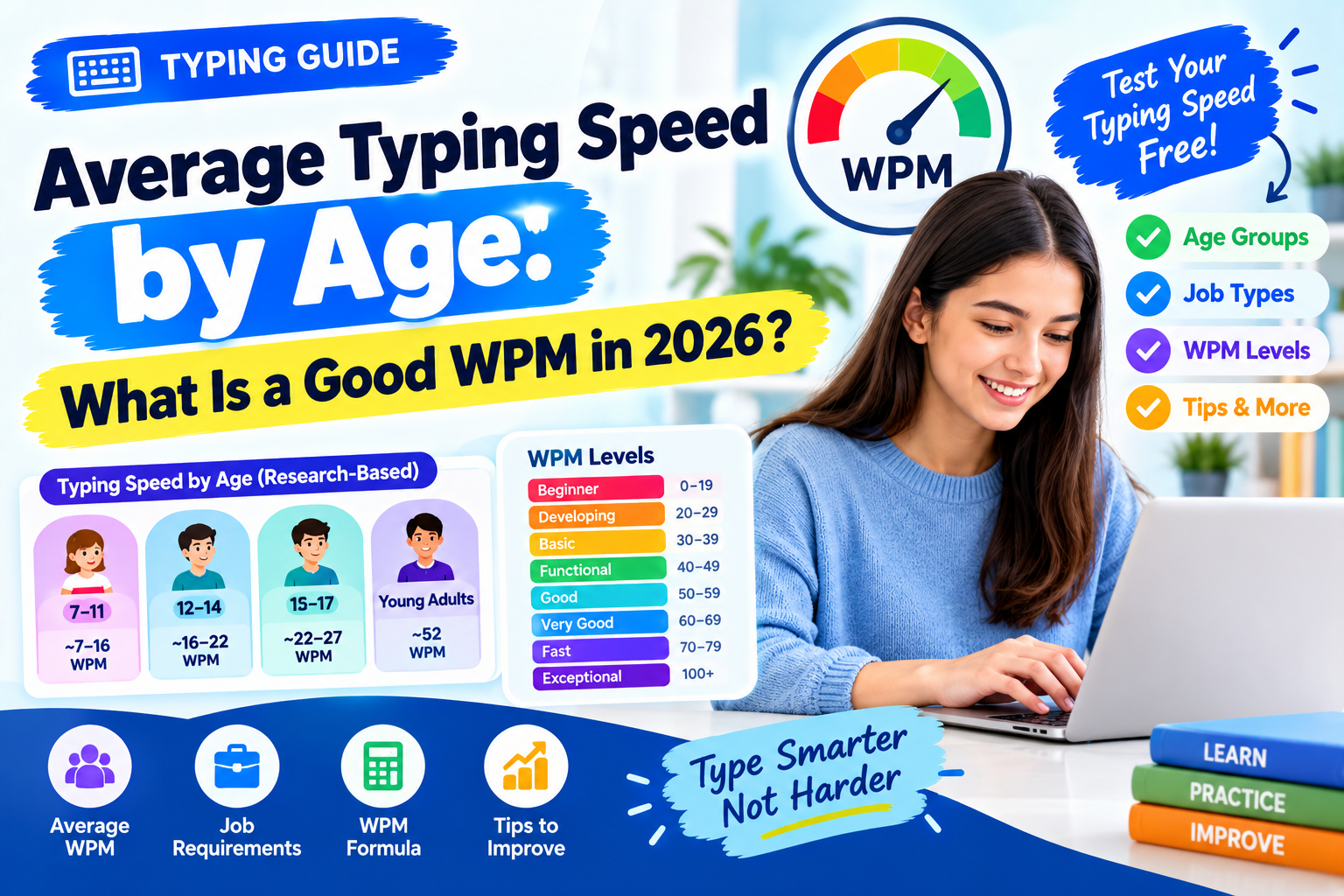
Before comparing your typing speed with an average, measure your own WPM.
Take the free Typing Speed Test →
Your words per minute (WPM) score tells you how quickly you can produce text on a keyboard. But speed is only part of the picture. Accuracy, test length, keyboard type, text difficulty, and the way the test calculates errors can all affect your result.
A score of 40 WPM is generally a useful everyday typing speed, while 50–60 WPM is a strong practical target for many computer users. If you reach 70–80 WPM while maintaining high accuracy, you are typing considerably faster than most everyday typists.
However, there is an important research detail: there is no single universal average typing speed that applies to everyone.
A large 2018 study by Dhakal, Feit, Kristensson, and Oulasvirta, involving 168,000 volunteers and more than 136 million keystrokes, reported a mean typing speed of 51.56 WPM. The researchers studied people who voluntarily completed an online typing test, so this number should not be treated as the exact average for the entire world's population.
That distinction matters when you see claims such as "the average person types 40 WPM" or "the average adult types 60 WPM."
Both may be useful benchmarks in the right context, but neither should be presented as a universal biological average.
What Is the Average Typing Speed?
The simplest answer is:
Around 40–50 WPM is a reasonable everyday benchmark for an adult computer user, while large online research datasets can produce averages around 52 WPM.
The best-known large-scale research benchmark comes from the 2018 study Observations on Typing from 136 Million Keystrokes by Dhakal et al.
The study analyzed:
- 168,000 volunteers
- More than 136 million keystrokes
- Participants from many countries
- English typing tasks
- Modern computer keyboards
- Typing speed and accuracy
- Different typing styles and finger usage
The reported mean was 51.56 WPM, with a standard deviation of about 20.2 WPM.
That means there was a very large amount of variation between individuals.
Someone typing 30 WPM is not necessarily a poor typist, just as someone typing 90 WPM is not automatically better at every keyboard task.
The study population also had a mean age of about 24.5 years, and most participants were between 11 and 30 years old. Because the participants volunteered to take an online typing test, they should not be treated as a perfectly representative sample of the general population.
So, what should you use as your benchmark?
For everyday purposes, this is a useful way to think about typing speed:
| WPM | General level | What it means |
|---|---|---|
| Under 20 | Beginner | Still developing basic keyboard familiarity |
| 20–29 | Developing | Functional but relatively slow |
| 30–39 | Basic | Usable for everyday typing |
| 40–49 | Average/functional | Comfortable for many everyday tasks |
| 50–59 | Good | Strong everyday typing speed |
| 60–69 | Very good | Fast enough for many professional tasks |
| 70–79 | Fast | Clearly above everyday typing speed |
| 80–99 | Very fast | Advanced typing ability |
| 100+ | Exceptional | Extremely fast compared with typical users |
These are practical performance levels, not official population percentiles.
Your accuracy should be considered alongside the number.
A 70 WPM result with frequent mistakes is less useful than a 60 WPM result with excellent accuracy.
Average Typing Speed by Age
One of the most searched questions is "What is the average typing speed by age?"
The honest answer is more complicated than most typing-speed charts suggest.
There is no single modern scientific study that provides a universally accepted WPM average for every age from childhood through old age.
Typing research uses different tasks, including copying, dictation, transcription, free composition, and timed typing tests. The task itself can significantly change the result.
For example, research by Horne, Ferrier, Singleton, and Read examined 952 students aged 11–17 using computer-based dictation. Their study found that typing speed increased substantially through the secondary-school years.
Their results showed typing speed rising from roughly 16 WPM at age 11 to about 22 WPM at age 14, with speeds reaching approximately 27 WPM by age 17 in the study's typing-to-dictation task.
Earlier research involving younger children also found that typing speed increased with age. A study discussed by Horne et al., based on Connelly et al. (2007), found typing performance on a standardized copying task increasing from about 7.2 WPM at age 7 to 11.23 WPM at age 11.
These numbers are useful research observations, but they should not be turned into rigid rules for children.
Research-backed typing-speed examples by age
| Age | Research-based reference | How to interpret it |
|---|---|---|
| Around 7 | ~7 WPM | Early keyboarding stage |
| Around 11 | ~11–16 WPM | Major development is underway |
| Around 14 | ~22 WPM | Typing ability typically improves substantially |
| Around 17 | ~27 WPM | Many students have developed much greater keyboard fluency |
| Young adults | ~52 WPM in a large online study | Large research sample, but not a population-wide age average |
| Older adults | No single reliable universal WPM | Individual experience and practice matter substantially |
The important point is that age alone does not determine typing speed.
Someone who has typed for several hours every day for 20 years may easily outperform a much younger person who rarely uses a physical keyboard.
Why Does Typing Speed Change With Age?
Typing is a learned motor skill, not simply a measure of age.
Your performance is influenced by:
- Years of keyboard experience
- Touch-typing ability
- Number of fingers used
- Familiarity with the keyboard layout
- Accuracy
- Daily typing volume
- Type of keyboard
- Text difficulty
- Language
- Whether you correct mistakes while typing
- How much text you can see ahead of the current character
Research supports the idea that typing performance can change with age, but it also shows that experience and skill are extremely important.
A 2022 BMJ study of 2,690 healthcare workers found a strong negative association between age and corrected typing speed. The participants had a mean corrected typing speed of 60.1 WPM, and typing speed decreased significantly with each age decade.
Interestingly, the same study found that people who had completed a typing course typed more than 20% faster than those who had not.
That is a useful lesson: practice and training can make a major difference.
Another classic study by psychologist Timothy A. Salthouse, published in the Journal of Experimental Psychology: General in 1984, examined typists from ages 19 to 72. The participants varied widely in typing ability, from 17 to 104 net WPM.
Salthouse found that older typists could compensate for slower underlying motor processes by using other strategies, including anticipating characters further ahead in the text.
So getting older does not automatically mean becoming a slow typist.
What Is a Good Typing Speed?
There is no single number that makes someone a "good typist."
A better question is:
Good for what?
Your ideal WPM depends on what you use a keyboard for.
30 WPM
At 30 WPM, you can handle basic computer tasks, messages, short documents, and casual writing.
It may feel slow if you spend most of your day typing, but it is perfectly usable for occasional computer users.
40 WPM
Is 40 WPM good? Yes.
40 WPM is a solid functional typing speed for everyday computer use.
At 40 WPM, you can produce approximately 200 standardized characters per minute because typing tests generally treat five characters as one word.
That is enough for emails, web forms, notes, school assignments, and many office tasks.
Some employers and government positions explicitly use 40 WPM as a qualification threshold.
For example, the U.S. Office of Personnel Management lists 40 WPM as a proficiency requirement for several clerk-typist and office-automation positions.
Government job postings in Pakistan also commonly specify 40 WPM for clerical and data-entry positions.
50 WPM
50 WPM is a good target for someone who regularly works on a computer.
You are fast enough to write most emails, documents, reports, and messages without feeling that the keyboard is slowing you down.
60 WPM
60 WPM is a very good practical typing speed.
For many office workers, writers, developers, students, and other computer users, reaching 60 WPM with strong accuracy is an excellent goal.
At this speed, typing becomes much less of a bottleneck when writing longer documents.
70–80 WPM
70–80 WPM is fast.
If you can consistently maintain this speed with 95%+ accuracy, you have developed strong keyboard skills.
This level can be particularly useful for people who spend a large portion of their working day typing.
100+ WPM
100 WPM is exceptional for ordinary computer users.
It is achievable with training, but you should not assume that everyone needs to reach it.
For most people, improving from 30 to 50 WPM produces a much larger practical benefit than trying to go from 80 to 100 WPM.
Typing Speed Chart: Beginner to Professional
Here is a simple WPM level chart you can use as a practical reference:
| Typing speed | Level | Typical use |
|---|---|---|
| 0–19 WPM | Beginner | Learning the keyboard |
| 20–29 WPM | Developing | Basic typing |
| 30–39 WPM | Basic | Casual computer use |
| 40–49 WPM | Functional | Everyday work and study |
| 50–59 WPM | Good | Regular computer users |
| 60–69 WPM | Very good | Professional computer work |
| 70–79 WPM | Fast | Advanced everyday typing |
| 80–99 WPM | Very fast | Highly proficient typists |
| 100–119 WPM | Exceptional | Advanced competitive/professional level |
| 120+ WPM | Elite | Rare typing speed |
Again, these are performance categories, not scientifically established percentile cutoffs.
If you want to know where you actually stand, taking the same typing test several times is more useful than comparing yourself with an arbitrary chart.
Typing Speed for Jobs: What WPM Do Employers Ask For?
There is no universal typing speed requirement for every job.
Employers normally set a requirement based on how important typing is to the position.
For example, a software developer may rarely be asked to prove a specific WPM score, while a data-entry operator may have a formal typing test.
Here are useful targets:
| Job type | Useful WPM target | Importance of accuracy |
|---|---|---|
| General office work | 40–50+ | High |
| Administrative work | 45–60+ | High |
| Data entry | 40–60+ | Very high |
| Customer support/chat | 40–60+ | High |
| Clerical jobs | 40+ | High |
| Stenography | 40–45+ typing plus shorthand | Very high |
| Writing-heavy roles | 50–70+ | Very high |
| Transcription | 60+ | Extremely high |
These are practical targets, not universal hiring rules.
Always check the actual job advertisement.
For example, the U.S. Office of Personnel Management specifies 40 WPM for several clerk-typist and office-automation positions.
Pakistan's National Jobs Portal has also published Data Entry Operator positions requiring 40 WPM, while some stenographer and court-related positions specify 40–45 WPM typing alongside a much higher shorthand requirement.
That means 40 WPM can be enough to meet a formal job requirement, even though a higher speed may make everyday work easier.
How Is WPM Calculated?
WPM means words per minute, but typing tests usually do not count dictionary words.
Instead, they use a standardized definition:
1 typing word = 5 characters
Characters normally include spaces and may include punctuation depending on the test.
The basic gross WPM formula is:
Gross WPM = (Total characters typed ÷ 5) ÷ time in minutes
For example, suppose you type 300 characters in one minute.
300 ÷ 5 = 60
Your gross typing speed is therefore 60 WPM.
Example with a two-minute test
Suppose you type 500 characters in two minutes.
500 ÷ 5 = 100 standardized words
100 ÷ 2 = 50 WPM
Your gross typing speed is 50 WPM.
This is why typing tests can report a WPM number even when the passage contains words of very different lengths.
The five-character rule makes results easier to compare.
Gross WPM vs Net WPM
This is one of the most important things to understand when comparing typing-test results.
Gross WPM
Gross WPM measures your raw typing output.
It counts everything you typed, including characters that were eventually wrong.
The common formula is:
Gross WPM = (characters typed ÷ 5) ÷ minutes
Net WPM
Net WPM attempts to account for mistakes.
One common convention is:
Net WPM = Gross WPM − (uncorrected errors ÷ minutes)
For example:
- Gross speed: 60 WPM
- Test duration: 1 minute
- Uncorrected errors: 5
- Net speed: 55 WPM
However, not every typing test uses exactly the same net-WPM calculation.
Some systems calculate net WPM from correctly typed characters instead:
Net WPM = (correct characters ÷ 5) ÷ minutes
Other systems count incorrect words rather than individual characters.
This is why two typing tests can sometimes give slightly different scores for the same performance.
Always check the scoring method
If you are comparing your score with a job requirement, school requirement, or another website, check:
- Whether spaces count
- Whether punctuation counts
- Whether errors are penalized
- Whether corrected errors count
- Whether the result is gross or net WPM
- How long the test lasts
A 60 WPM result from one test is not automatically identical to a 60 WPM result from another test.
Why Accuracy Matters More Than You Think
Typing faster is useful only when the text you produce is accurate.
Imagine two typists:
Typist A
- 70 WPM
- 88% accuracy
Typist B
- 58 WPM
- 98% accuracy
For professional writing, Typist B may produce more useful text because fewer corrections are required.
Mistakes also consume time.
You type a sentence incorrectly, notice the error, move the cursor or press backspace, correct it, and continue.
That entire process reduces your effective productivity.
For this reason, a good training strategy is:
Accuracy first → consistency second → speed third
Once your fingers know where the keys are, speed usually becomes easier to improve.
What Is a Good Typing Speed for a Teenager?
A teenager's typing speed can vary enormously depending on keyboard experience.
Research by Horne et al. involving 952 students aged 11–17 found that typing speed increased substantially through the teenage years.
In their computer-based dictation study, average typing speed rose from approximately 16 WPM around age 11 to about 22 WPM around age 14 and nearly 27 WPM by age 17.
A separate study of younger UK children found typing speed increasing from about 7.2 WPM at age 7 to 11.23 WPM at age 11 on a standardized copying task.
These studies show why a single "average typing speed for a teenager" can be misleading.
A 12-year-old learning touch typing for the first time and a 17-year-old who has used a keyboard every day can have completely different results.
For a practical goal, teenagers can focus on reaching 30–40 WPM with high accuracy, then work toward 50 WPM or more as their keyboard experience increases.
The exact target should depend on school requirements and the amount of typing they actually do.
How to Increase Your Typing Speed
If your typing speed is below your target, you do not need to practice for hours every day.
Consistent short sessions are usually more practical.
1. Learn touch typing
Try to use all of your fingers rather than relying on two or three fingers.
Touch typing reduces the amount of time you spend searching for keys.
2. Stop looking at the keyboard
Looking down repeatedly interrupts your rhythm.
Start slowly and build the ability to find keys without looking.
3. Focus on accuracy
Do not immediately try to beat your highest WPM score.
If you are typing 35 WPM at 95–98% accuracy, gradually increase your speed while keeping accuracy high.
4. Practice difficult letter combinations
Some combinations are naturally more difficult because of the movement between fingers.
Identify the keys and combinations that cause repeated mistakes and practice them separately.
5. Use longer tests
A 15-second typing test can produce an unusually high score because you may type faster during a short burst.
A one-minute or three-minute test gives you a better idea of your sustainable typing speed.
6. Test yourself regularly
Use the Typing Speed Test once or twice a week and record:
- WPM
- Accuracy
- Errors
- Test duration
Do not judge progress from a single result.
Look at your average across several tests.
Why Your Typing Speed Changes From Test to Test
It is normal for your WPM score to fluctuate.
You might score 52 WPM one day and 58 WPM the next.
That does not necessarily mean you suddenly became faster.
Several factors can affect the result.
Text difficulty
A passage containing familiar short words is easier to type than one containing unusual vocabulary, numbers, punctuation, and symbols.
Keyboard
Laptop keyboards, mechanical keyboards, low-profile keyboards, and different layouts can feel very different.
Test length
Short tests emphasize burst speed.
Longer tests measure endurance and consistency.
Fatigue
Typing after several hours of computer work can produce a lower score.
Accuracy rules
A test that heavily penalizes errors will produce a different net WPM from one that only reports raw keystroke speed.
Language
Typing speed is highly dependent on the language and text being typed.
Do not compare an English WPM score directly with a score from another language unless the testing method is equivalent.
Average Typing Speed vs Your Own Personal Average
Instead of asking only:
"What is the average typing speed?"
also ask:
"What is my average typing speed?"
Your personal average is often much more useful.
For example, suppose your last five one-minute tests produced:
| Test | WPM | Accuracy |
|---|---|---|
| 1 | 42 | 96% |
| 2 | 45 | 97% |
| 3 | 43 | 98% |
| 4 | 47 | 96% |
| 5 | 46 | 98% |
Your average speed is:
(42 + 45 + 43 + 47 + 46) ÷ 5 = 44.6 WPM
That 44.6 WPM is a better personal benchmark than worrying about whether the "average person" types exactly 40, 50, or 52 WPM.
Repeat the same test format over time and watch your own trend.
Is 40 WPM Good?
Yes.
For everyday computer use, 40 WPM is a perfectly respectable typing speed.
It is especially meaningful if you can maintain it with 95%+ accuracy.
For many clerical and data-entry positions, 40 WPM is also a formal minimum requirement.
But if you spend most of your working day typing, you may benefit from aiming higher.
A practical progression could look like this:
40 WPM → functional
50 WPM → good
60 WPM → very good
70 WPM → fast
80+ WPM → very fast
You do not need 100 WPM to be productive.
The goal should be to type fast enough that your keyboard no longer interrupts your thinking.
How Long Does It Take to Reach 60 WPM?
There is no scientifically reliable timetable that guarantees a person will reach a particular WPM in a specific number of weeks.
Your starting point matters.
So does your technique.
Someone starting at 20 WPM may need significantly more practice than someone already typing at 45 WPM.
Instead of setting a deadline such as "I will reach 60 WPM in 30 days," set measurable goals:
- Maintain 95% accuracy
- Stop looking at the keyboard
- Use more fingers consistently
- Practice difficult keys
- Complete several tests each week
- Track your average WPM
- Increase speed gradually
A sustainable improvement is more useful than chasing one unusually high test score.
Frequently Asked Questions
What is the average typing speed?
There is no single scientifically established average for the entire population.
A large 2018 study by Dhakal, Feit, Kristensson, and Oulasvirta analyzed 168,000 volunteers and reported a mean typing speed of 51.56 WPM. Because the participants voluntarily completed an online typing test, the result should be treated as a large research benchmark rather than a universal population average.
For everyday use, 40–50 WPM is a reasonable practical benchmark for many adults.
What WPM do employers ask for?
There is no universal requirement.
Many clerical, office, and data-entry positions use around 40 WPM as a minimum. The U.S. Office of Personnel Management, for example, lists 40 WPM for several clerk-typist and office-automation positions.
Some specialized typing-heavy jobs may require substantially more.
Always check the exact job description because employers can define both the required WPM and the accuracy standard.
How is WPM calculated?
The common typing-test convention treats five characters as one word.
Gross WPM is calculated by dividing total characters by five and then dividing by the number of minutes.
For example, 300 characters typed in one minute equals 60 gross WPM.
Net WPM adjusts the result for errors, but different tests use different error formulas. Some subtract uncorrected errors while others count only correctly typed characters.
Is 40 WPM good?
Yes. 40 WPM is a useful everyday typing speed and is also a common formal minimum for clerical and data-entry positions.
If you can type 40 WPM with high accuracy, you have a solid foundation.
Is 50 WPM good?
Yes. 50 WPM is a good practical typing speed for regular computer users.
It is fast enough for many office, school, writing, and communication tasks.
Is 60 WPM fast?
60 WPM is a very good practical speed.
For someone who types regularly, 60 WPM with high accuracy is an excellent target.
What is a good typing speed for a teenager?
There is no single correct number because typing experience varies significantly between teenagers.
Research on students aged 11–17 found typing speed increasing substantially throughout the teenage years. As a practical goal, 30–40 WPM with strong accuracy is a reasonable target for many teenagers, with higher speeds achievable through regular practice.
Does age affect typing speed?
Age can be associated with typing performance, but it is not the only factor.
Research has found age-related differences in typing performance, while other studies show that experienced older typists can compensate for slower underlying motor processes.
Practice, keyboard experience, accuracy, and technique can have a major effect.
Does touch typing make you faster?
Touch typing can help because it reduces the need to visually search for keys and can improve consistency.
However, typing speed depends on many factors. Some people can type quickly without following traditional touch-typing finger assignments.
The important goal is efficient, accurate, repeatable movement.
Should I focus on WPM or accuracy?
Focus on both, but accuracy should come first.
A high WPM score with many errors can be less useful than a slightly slower score with excellent accuracy.
For professional typing, a good combination is more valuable than raw speed alone.
Final Takeaway
The average typing speed depends heavily on who was tested and how the test was conducted.
A large 2018 research dataset reported an average of 51.56 WPM among 168,000 online volunteers, while other research has shown substantial differences between age groups, experience levels, and professional groups.
For practical everyday use, you can think of the following levels:
- 30 WPM: basic
- 40 WPM: functional
- 50 WPM: good
- 60 WPM: very good
- 70–80 WPM: fast
- 100+ WPM: exceptional
If you are wondering whether your typing speed is good, the best approach is not to compare yourself with a random number on the internet.
Take a consistent test, measure your WPM and accuracy, and track your results over time.
Try TrendPro's free Typing Speed Test →
You can also use the Word Counter to measure written output and the Character Counter when you need to work with character limits.
Research and Sources
This article uses the following named research as its primary evidence:
-
Dhakal, V., Feit, A. M., Kristensson, P. O., & Oulasvirta, A. (2018). "Observations on Typing from 136 Million Keystrokes." CHI '18 Proceedings of the 2018 CHI Conference on Human Factors in Computing Systems. DOI: 10.1145/3173574.3174220.
-
Horne, J. K., Ferrier, J., Singleton, C. H., & Read, C. (2011). "Computerised assessment of handwriting and typing speed." Educational & Child Psychology, 28(2), 52–66. The study included 952 students aged 11–17 and examined age-related development in typing speed.
-
Salthouse, T. A. (1984). "Effects of Age and Skill in Typing." Journal of Experimental Psychology: General, 113(3), 345–371. DOI: 10.1037/0096-3445.113.3.345.
-
Schuurman, A. R. et al. (2022). "Digital disparities among healthcare workers in typing speed between generations, genders, and medical specialties." BMJ, 379:e072784. The study examined 2,690 healthcare workers and found significant differences in typing speed across age groups and professional specialties.
The age figures in this article should therefore be understood as research observations and practical benchmarks rather than universal age-specific norms. Test conditions, typing method, keyboard, language, accuracy rules, and prior experience can all change WPM.