
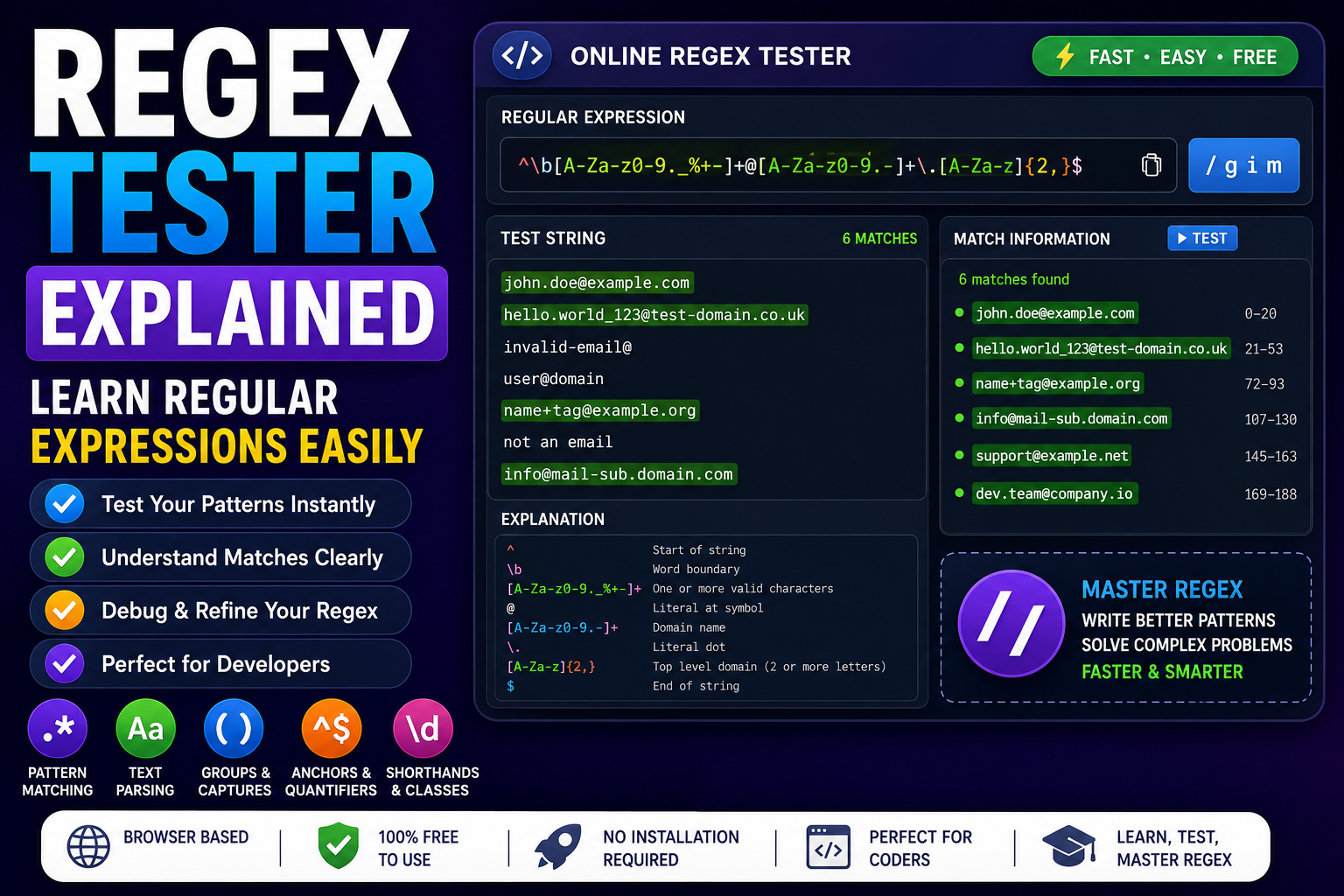
Regular expressions can look complicated when you first encounter them.
You might see a pattern such as:
^[A-Za-z0-9._%+-]+@[A-Za-z0-9.-]+\.[A-Za-z]{2,}$and wonder what all those symbols actually mean.
The good news is that regular expressions become much easier once you understand the basic syntax and how the individual components work together.
A regex tester makes this learning process much easier because you can enter a pattern, provide sample text, and immediately see which parts match.
Regular expressions are widely used in programming, web development, software development, data processing, validation, and text parsing.
In this guide, you'll learn what a regular expression is, how a regex checker works, common regex syntax, useful regex examples, and how to test patterns using an online tool.
What Is a Regular Expression?
A regular expression, commonly called regex or regexp, is a sequence of characters that defines a search pattern.
Instead of searching for one exact word, a regular expression allows you to describe a pattern.
For example:
catmatches:
catBut this pattern:
c.tcan match:
cat
cot
cut
c9t
because the dot represents a wildcard character.
This ability to describe patterns is what makes regular expressions powerful.
What Is a Regex Tester?
A regex tester is a tool that lets you test regular expressions against sample text.
A typical regex testing workflow looks like this:
- Enter a regular expression.
- Enter the text you want to search.
- Run the pattern.
- Review the matches.
- Modify the pattern if necessary.
- Test it against additional examples.
For developers, this can be much faster than repeatedly changing application code just to determine whether a pattern works.
A browser-based regex tester is particularly convenient because it doesn't require installing another application.
Why Use Regex Online?
You can write regular expressions manually, but testing them immediately is much more efficient.
A regex online tool can help you:
- Test patterns quickly
- Find syntax mistakes
- Understand matches
- Experiment with regex syntax
- Learn regular expressions
- Validate sample input
- Debug existing patterns
- Build patterns before adding them to code
This makes online regex tools useful additions to a developer toolkit.
How Does Regex Pattern Matching Work?
Regex works by comparing a pattern against text.
Consider:
helloGiven this text:
hello worldthe regex engine finds:
helloThe pattern describes what the engine should look for.
More complex patterns can describe:
- Numbers
- Letters
- Dates
- Email addresses
- URLs
- Whitespace
- Repeated characters
- Specific prefixes
- Specific suffixes
- Structured text
Basic Regex Syntax
You don't need to memorize every regex feature to start using regular expressions.
Start with the most common characters.
Literal Characters
Regular letters generally match themselves.
hellomatches:
hellobut not:
Helloin case-sensitive matching.
The Dot Character
The dot:
.usually matches a single character except newline characters, depending on the regex engine and settings.
For example:
c.tcan match:
cat
cot
cut
The dot is one of the most commonly used regex metacharacters.
Character Classes
Square brackets define a character class.
For example:
[abc]matches one character that is either:
- a
- b
- c
You can also use ranges.
[a-z]matches lowercase letters from a through z.
Similarly:
[0-9]matches digits from 0 through 9.
Negated Character Classes
A caret inside a character class can mean "not."
For example:
[^0-9]matches a character that isn't a digit.
This is useful when you need to find characters outside a specific range.
Quantifiers
Quantifiers determine how many times something should occur.
Asterisk
The asterisk:
*means zero or more occurrences.
For example:
ab*can match:
a
ab
abb
abbb
Plus Sign
The plus sign:
+means one or more occurrences.
For example:
ab+can match:
ab
abb
abbb
but not just:
aQuestion Mark
The question mark:
?usually means zero or one occurrence.
For example:
colou?rcan match both:
color
colour
This is useful when a character is optional.
Exact Quantifiers
Curly brackets let you specify an exact number of repetitions.
For example:
[0-9]{4}matches exactly four digits.
Examples include:
1234
2026
9876
but not:
123
12345
Regex Ranges
You can also specify minimum and maximum repetitions.
For example:
[0-9]{2,5}matches between two and five digits.
It can match:
12
123
1234
12345
but not:
1
123456
Anchors in Regular Expressions
Anchors allow you to specify where a match should occur.
Start of String
The caret:
^can represent the beginning of a string.
For example:
^Hellomatches:
Hello worldbut may not match:
Say HelloEnd of String
The dollar sign:
$can represent the end of a string.
For example:
world$matches:
Hello worldbut not:
world todayCombining Anchors
You can combine both anchors when you want to validate an entire string.
For example:
^[0-9]{4}$means the entire input must contain exactly four digits.
It can match:
2026
1234
9876
but not:
Year 2026
12345
12
This distinction is extremely important when using regex for validation.
Common Regex Shorthand Classes
Regular expressions provide shorthand character classes for common patterns.
Digits
\dusually represents a digit.
Equivalent to:
[0-9]in common regex flavors.
Non-Digit
\Dusually represents a non-digit.
Word Character
\wcommonly represents a word character such as a letter, digit, or underscore.
Non-Word Character
\Wmatches a character that isn't considered a word character.
Whitespace
\scommonly represents whitespace.
Non-Whitespace
\Smatches a non-whitespace character.
Exact behavior can vary between regex engines, so always check the flavor used by your programming language or tool.
Common Regex Flags
Regex engines often support flags that change how patterns behave.
Case-Insensitive
The i flag makes matching case-insensitive.
For example:
/hello/ican match:
hello
Hello
HELLO
Global
The g flag can instruct certain regex implementations to find multiple matches instead of stopping after the first match.
Example:
/hello/gMultiline
The m flag changes how anchors such as ^ and $ behave across multiple lines in regex engines that support it.
Flags differ slightly between programming languages, so don't assume that every regex engine behaves identically.
Useful Regex Examples
Learning through examples is usually easier than memorizing syntax.
Find Numbers
\d+can find one or more consecutive digits.
It can match:
123
2026
98765
Find Five-Digit Numbers
\b\d{5}\bcan be used to find five-digit numbers as separate word-like tokens in many regex flavors.
Example:
My postal code is 54000.The pattern can identify:
54000Find Words Starting With a Specific Letter
A simple pattern for ASCII text is:
\b[Aa][a-zA-Z]*\bThis can find words beginning with A or a.
Find a Simple Date
A basic date pattern could look like:
\b\d{4}-\d{2}-\d{2}\bThis can find dates formatted like:
2026-08-31
2025-12-25
2024-01-01
However, this pattern checks the structure, not whether the date is actually valid.
For example, it could still match:
2026-99-99A regex pattern alone is not always sufficient for complete data validation.
Email Regex Example
A commonly used basic email pattern is:
^[^\s@]+@[^\s@]+\.[^\s@]+$This can match basic addresses such as:
user@example.com
hello@domain.com
name@example.org
But email address syntax is more complicated than this pattern suggests.
For production applications, don't assume that a short regex provides complete RFC-level email validation.
URL Regex Example
URLs can also be matched using regular expressions, although URL syntax is complex.
A simplified pattern might be:
https?://[^\s]+This looks for:
http://example.com
https://example.com
https://example.com/page
For production URL handling, using the URL parser provided by your programming language is often more reliable than building an enormous regex.
Password Validation With Regex
Regex is sometimes used to check password requirements.
For example, a simplified pattern could require:
- At least eight characters
- At least one uppercase letter
- At least one lowercase letter
- At least one number
An example pattern is:
^(?=.*[A-Z])(?=.*[a-z])(?=.*\d).{8,}$This demonstrates how lookaheads can be used to enforce multiple conditions.
However, password security involves more than matching character categories. A password can satisfy these rules and still be weak.
What Are Lookaheads?
Lookaheads allow a regex engine to check whether a condition exists without consuming those characters as part of the match.
For example:
(?=.*\d)can assert that a digit exists later in the string.
Lookaheads are powerful but can make regex patterns harder to understand.
If a pattern becomes difficult to maintain, break the validation into simpler conditions in your application code.
Regex Groups
Parentheses create groups.
For example:
(cat|dog)matches either:
cat
dog
Groups can also be used for capturing portions of a match.
For example:
(\d{4})-(\d{2})-(\d{2})can capture the year, month, and day separately.
This is useful when you need to extract information rather than simply determine whether text matches.
Regex Alternation
The pipe symbol:
|means "or."
For example:
cat|dogmatches either:
cat
dog
You can combine alternation with groups:
(I like|I love) (cats|dogs)This provides several possible combinations.
Regex Escaping
Some characters have special meanings in regex.
Examples include:
.
*
+
?
(
)
[
]
{
}
^
$
|
If you want to search for one of these characters literally, you often need to escape it with a backslash.
For example, to match a literal dot:
\.Without the backslash, the dot generally means "any character."
Understanding escaping is one of the most important parts of writing reliable regular expressions.
Regex Tester for Text Parsing
One of the biggest uses of regular expressions is text parsing.
Suppose you have a large block of text containing product IDs:
Product: ABC-123
Product: XYZ-456
Product: DEV-789
You could use:
[A-Z]{3}-\d{3}to find the product IDs.
This can be useful for:
- Log analysis
- Data extraction
- Content processing
- File processing
- Data cleanup
- Developer scripts
- Automated workflows
Regex for Log Files
Developers often work with logs containing structured information.
For example:
2026-08-31 10:42:21 ERROR Database connection failed
2026-08-31 10:43:18 INFO Request completed
A regex could help identify:
- Dates
- Times
- Log levels
- IDs
- IP addresses
- Error messages
This makes regex useful for debugging and system administration.
Regex in Web Development
Regular expressions appear throughout web development.
They can be used for:
- Form validation
- Input filtering
- Text extraction
- Search functionality
- Data processing
- URL handling
- Content transformation
For example, a form might use JavaScript to check whether an input follows a particular format.
However, client-side validation should not be treated as a security boundary.
Important validation should also happen on the server.
Regex in JavaScript
JavaScript has built-in support for regular expressions.
For example:
const pattern = /hello/i;

console.log(pattern.test("Hello world"));
The result is:
trueJavaScript also provides methods such as:
match()
test()
replace()
search()
split()
for working with regular expressions.
Regex in Python
Python provides the re module for regular expressions.
Example:
import re

pattern = r"\d+"
text = "There are 25 items"

matches = re.findall(pattern, text)

print(matches)
The result is:
['25']Python is widely used for data processing, automation, and text analysis, making regex particularly useful.
Regex in PHP
PHP also provides regular expression functions.
For example:
$pattern = '/\d+/';
$text = 'Order 12345';

preg_match($pattern, $text, $matches);

print_r($matches);
Regex is commonly used in PHP applications for validation and text processing.
Regex Flavors Matter
One important detail beginners often overlook is that regular expressions are not completely identical across all programming languages.
Different regex engines may support different:
- Syntax
- Flags
- Escape sequences
- Lookaround features
- Unicode behavior
- Character classes
Common environments include:
- JavaScript
- Python
- PHP
- Java
- .NET
- Ruby
- Go
- Perl
A regex that works in one environment may require modifications in another.
This is why a good regex tester should ideally allow you to select or understand the regex flavor being tested.
Regex Tester vs Regex Checker
The terms regex tester and regex checker are often used interchangeably.
In practice, a regex tester usually allows you to actively experiment with:
- Patterns
- Test strings
- Matches
- Groups
- Flags
A regex checker may emphasize whether a pattern is valid or whether specific input matches.
The exact terminology depends on the tool.
Common Regex Mistakes
Forgetting Anchors
If you want to validate an entire input, you may need anchors.
For example:
^[0-9]{4}$is different from:
[0-9]{4}The second pattern can potentially find four digits inside a larger string.
Overusing .*
Beginners often use:
.*everywhere.
Although this can be useful, it can also make patterns overly broad and harder to reason about.
Use more specific patterns whenever possible.
Forgetting to Escape Special Characters
A literal period should generally be represented as:
\.rather than:
.when you specifically need to match a dot.
Assuming Regex Validates Everything
Regex can check structure, but it doesn't automatically understand the meaning of the data.
For example:
\d{4}-\d{2}-\d{2}can match an incorrectly structured date such as:
2026-99-99The application may need additional validation.
Using Extremely Complex Patterns
A massive regex may technically solve a problem but become difficult to maintain.
If your pattern takes an entire page to explain, consider whether normal programming logic would be clearer.
Regex is a tool, not a requirement.
How to Use an Online Regex Tester
A typical workflow is simple.
Step 1: Define the Problem
Decide what you want to find, validate, or extract.
Step 2: Write a Basic Pattern
Start with the simplest pattern possible.
Step 3: Enter Test Data
Provide several realistic examples.
Include both valid and invalid cases.
Step 4: Check the Matches
See exactly what your pattern matches.
Step 5: Add Complexity Gradually
Add character classes, quantifiers, groups, or anchors only when needed.
Step 6: Test Edge Cases
Try:
- Empty input
- Very long input
- Unexpected characters
- Missing values
- Extra spaces
- Uppercase and lowercase variations
Step 7: Move the Pattern Into Your Code
Once the pattern behaves correctly, add it to your application.
This workflow reduces debugging time.
How to Learn Regular Expressions Faster
The fastest way to learn regex is not to memorize hundreds of symbols.
Instead, learn the fundamentals and practice.
Start with:
- Literal characters
- Character classes
- Quantifiers
- Anchors
- Groups
- Alternation
- Shorthand classes
- Flags
- Lookarounds
- Capturing and replacement
Then build small patterns yourself.
For example, start with:
\d+Then:
\d{4}Then:
^\d{4}$Each step introduces another concept without overwhelming you.
Regex and Other Developer Tools
Regex is only one part of a modern developer toolkit.
When working with APIs and web applications, you may also need tools for:
- JSON formatting
- Base64 encoding
- URL encoding
- Data conversion
- Text processing
- Debugging
- Validation
For example, after extracting structured data with regex, you may need to format it as JSON.
Similarly, API data may contain Base64-encoded content that needs to be decoded.
Using several focused developer utility tools online can make these workflows much faster.
Regex and JSON
Regex can sometimes be useful for finding simple patterns inside JSON text.
However, regex is generally not the right tool for fully parsing JSON.
JSON has a formal structure and should normally be parsed with a JSON parser.
For example, if you receive an API response, use a JSON parser or JSON formatter rather than trying to understand nested JSON with a giant regex.
This is an important distinction for developers.
Regex and URL Encoding
Regex and URL encoding solve different problems.
Regex identifies or manipulates patterns in text.
URL encoding transforms characters so they can safely be represented inside URLs.
For example, spaces may become:
%20If you're processing URLs, you may need both regex and URL encoding tools, but they should not be confused with each other.
Regex and Base64
Base64 is another form of data encoding.
Regex is used to describe patterns.
Base64 is used to represent binary or textual data using a restricted character set.
For example, a Base64 encoder may convert:
Hellointo:
SGVsbG8=These are completely different concepts.
When Should You Use Regex?
Regex is a good choice when:
- You need to find patterns in text
- You need simple validation
- You need to extract structured information
- You need to replace matching text
- You are processing logs
- You are cleaning data
- You need pattern-based searching
Regex may not be the best choice when:
- A dedicated parser already exists
- The data structure is highly complex
- Normal application logic would be clearer
- The pattern becomes impossible to maintain
The goal is not to use regex everywhere.
The goal is to use it where pattern matching is the right solution.
Frequently Asked Questions
What is a regex tester?
A regex tester is a tool that lets you test regular expressions against sample text and see which portions match.
What is regex?
Regex, short for regular expression, is a pattern language used to search, validate, extract, and manipulate text.
What is a regular expression used for?
Regular expressions are commonly used for pattern matching, validation, text parsing, data extraction, searching, and replacement.
Is regex difficult to learn?
Regex has a learning curve, but the basic syntax is relatively small. Learning character classes, quantifiers, anchors, groups, and alternation gives you a strong foundation.
What does \d mean in regex?
In many regex flavors, \d represents a digit.
What does \w mean?
In many regex flavors, \w represents a word character, although its exact behavior can vary between regex engines.
What does .* mean?
A dot followed by an asterisk generally means zero or more occurrences of any character other than newline, depending on the regex engine and flags.
Can regex validate email addresses?
Regex can validate the basic structure of an email address, but complete email syntax is complicated. A simple regex should not be treated as complete standards-level validation.
Can regex validate passwords?
Yes. Regex can check requirements such as minimum length and the presence of different character categories. However, regex alone does not determine whether a password is truly secure.
Is regex the same in every programming language?
No. Regex syntax and features vary between programming languages and regex engines. Always test a pattern using the flavor you will actually use.
Should I use regex to parse JSON?
Generally, no. JSON should be parsed with a proper JSON parser because JSON has a structured grammar.
What is the best way to learn regex?
Start with simple patterns and gradually learn character classes, quantifiers, anchors, groups, alternation, flags, and lookarounds. Practice each concept using a regex tester.
Final Thoughts
Regular expressions can look intimidating, but they're essentially a language for describing text patterns.
Once you understand the basic building blocks, patterns that initially look complicated become much easier to read.
A regex tester is one of the most useful ways to learn because it gives you immediate feedback.
Instead of writing a pattern and hoping it works, you can test it against real examples, identify unexpected matches, and refine the expression before putting it into your application.
For developers, regex is particularly useful for pattern matching, validation, extraction, log analysis, and text parsing.
At the same time, regex shouldn't be treated as a universal solution. Dedicated parsers and normal application logic are often better for structured data.
The most effective approach is to learn the fundamentals, keep patterns as simple as possible, test them thoroughly, and use the appropriate tool for each problem.
If you're building websites, APIs, scripts, or other software, keeping a collection of coding tools, programming tools, and browser based utilities available can significantly speed up everyday development tasks.
A good online regex tester can be one of those tools, especially when you're learning regular expressions or debugging a pattern.